 QuickCue
Add to Chrome
Using QuickCue to Keep Roleplay Chats Moving
Disclosure. The platform links in this post are affiliate links. If you sign up through them I may earn a commission, at no extra cost to you. This post mentions companion sites with adult content and is for readers 18 and older.
A long roleplay or companion chat lives or dies on momentum. The problem is that keeping it moving means typing a reply every single turn, and that gets tiring fast — especially when all you really want is for the scene to keep unfolding, not to stop and compose the next line yourself. That's the gap QuickCue fills.
QuickCue is a sidebar of premade reply cards that sits next to the chat. A few kinds get the most use. Narrative-direction cards put the character's name next to a word like "continues" — one click, and the scene moves forward in their hands instead of mine. Scene-description cards nudge the chat toward fleshing out setting or action instead of just dialogue, useful when a scene has gone flat or stuck to back-and-forth talk for too long.
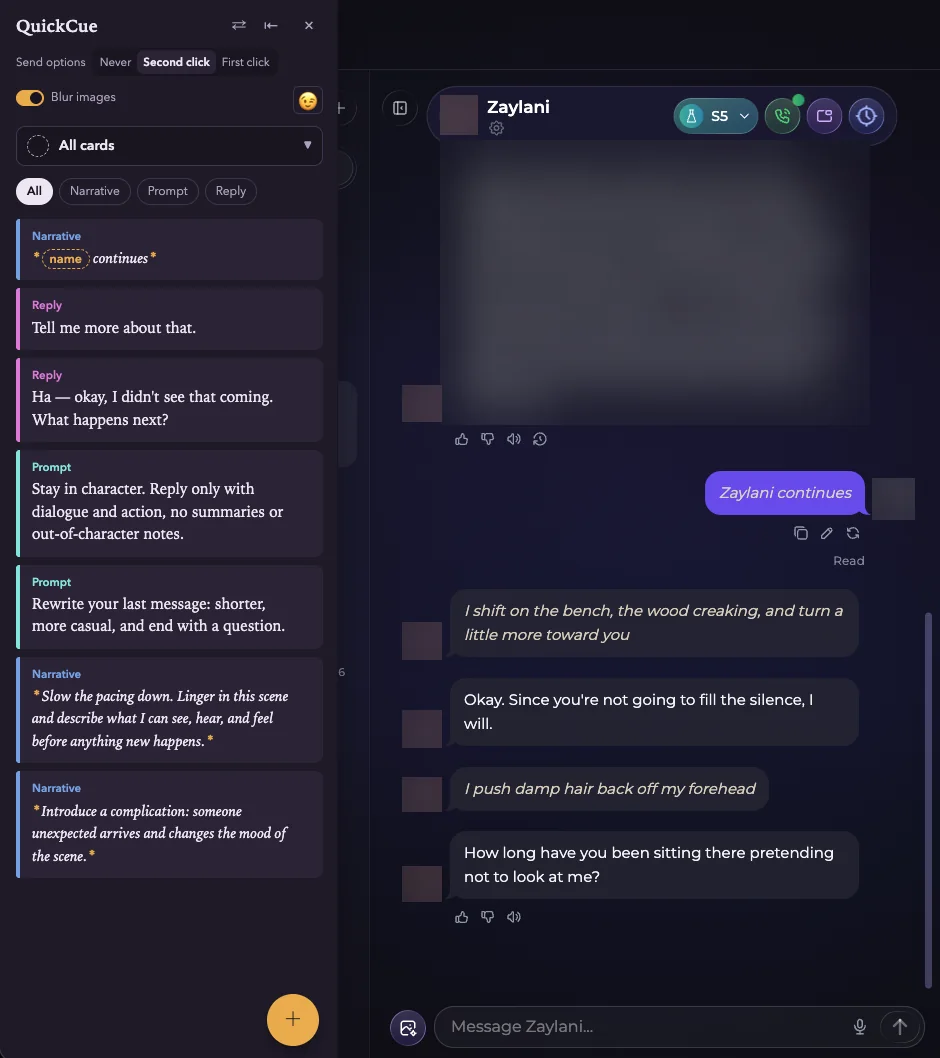
Time-skip cards are another one I lean on constantly — "an hour passes," "the scene jumps ahead to the next day" — since that's such a repetitive beat to type out by hand every time you want to move the story forward without narrating every minute in between. And for anyone running a roleplay built around a specific character archetype, a card for that character's signature action is worth setting up too — a swordsman drawing their blade into a fight, or any move that character repeats as part of who they are. Any line you find yourself typing more than once is worth turning into a card.
This isn't really about saving time — it's about staying in the scene rather than stepping outside it to figure out what to type next. The story keeps its own momentum, and you stay a reader and director of it instead of its sole author every single turn.
QuickCue works on Candy AI, Our Dream AI, and Secrets AI, as well as general chat sites.